World clock
Today in your world on the board: the date, the time of day and the weather, with buttons that move time on as the book counts it. Every move can be undone.
- Default size
- 4 × 4 (smallest 3 × 3)
- More than one
- No
- Needs
- A calendar, set up on the World page
- Players can see it
- Through the scene card, when it follows the clock
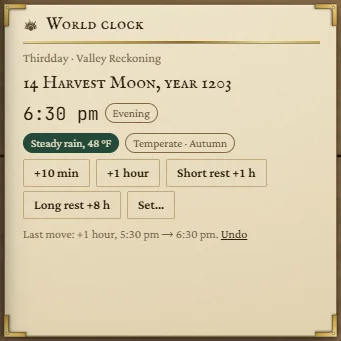
What it shows
- The day of the week and the name of the years, then the date.
- The time, and the part of the day it falls in (Evening here).
- Today's weather, the climate and the season. A day whose weather brings one of the book's hazards (extreme cold or heat, heavy rain or snow, strong wind) is flagged.
With no calendar yet, the tile asks you to set one up on the World page.
Moving time on
| Button | Moves the clock |
|---|---|
| +10 min | Ten minutes |
| +1 hour | An hour |
| Short rest +1 h | An hour, logged as a short rest |
| Long rest +8 h | Eight hours, logged as a long rest |
| Set… | Any number of days on (or back, below zero) and a time of day. Press Set; it can reach any date, years away included. |
Passing midnight starts a new day, and the new day's weather rolls from your weather tables. The line under the buttons names the last move, with Undo.
The clock also moves by itself: rests taken on the Party page and the end of a fight on the Initiative tracker add their time. Every move is listed on the World page's calendar under The clock's moves.
On the players' screen
Tick Day, Time and Weather follow the World clock in the scene card (see The scene card), and the TV's Day, Time and Weather change whenever this clock moves.
The party camps for the night. Press Long rest +8 h. The clock passes midnight, so a new day's weather is rolled from your weather tables. Pressed it by mistake? Undo is under the buttons.