Tonight
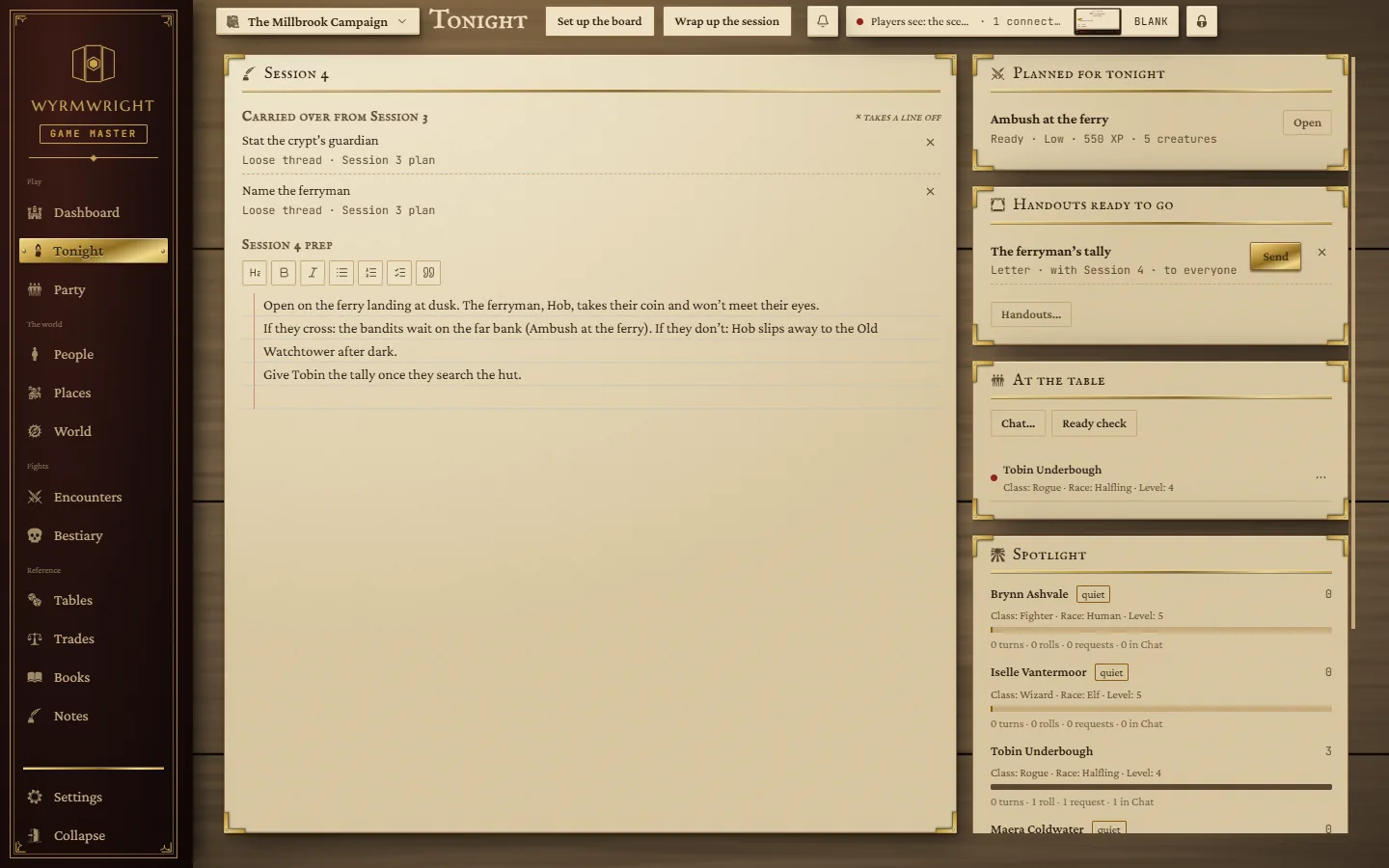
The page a session is run from. On the left, the session's own note, with whatever was left over from last time on top. On the right, the encounters planned for it, the handouts waiting to go, who is at the table, and how much of the evening each character has had.
- Where
- Tonight, in the rail under Play
- Works with
- Notes, Encounters, The players' window
Which session it shows
Tonight shows the newest session, as long as it has no date or its date is today or later. When there isn't one, the page offers Add Session N, which makes the next session in Notes.
The session's note
The big card on the left is the session's note: the same note Notes files under that session, edited here rather than copied. With no note yet, the first words you write make one called Session N prep. Type @ to name someone. The toolbar has headings, bold, italic, lists, tick boxes and quotes.
Carried over
Above the note, Carried over from Session N lists what the session before left behind, each line saying where it came from:
- Loose threads: tick boxes left unticked in that session's notes.
- Unfinished encounters: that session's encounters with creatures never sent to the tracker.
- Requests still in the bell, including ones put off until after a fight.
The cross on a line takes it off the list. Ticking the box in the old note, sending the creatures or answering the request takes it off too.
Down the right
- Planned for tonight: the encounters filed under this session on the Encounters page, with their status, difficulty, XP and how many creatures. Open takes you to the encounter. Last session's encounters with creatures never sent show here too.
- Handouts ready to go: handouts kept for this session or for one of its encounters. Send sends one now; the cross takes it off without sending (with Undo). Ones kept for a session gone by, or an encounter since run or deleted, are listed under Kept for a time gone by. Handouts… opens the Handouts dialog set to keep a new one for tonight. See Handouts.
- At the table: everyone seated from WyrmWright Player, a raised hand and how long it has been up, and answers to a ready check. It shows even while your table is closed, so you can write to the chat before anyone joins. Chat… opens the table's chat (also on the board as the Chat tile); Ready check asks everyone. Right-click a seat (or press its ⋯) to whisper, give Inspiration or ask that one player if they're ready.
- Spotlight: for you only, how much of tonight each character has had. See Spotlight.
- Party vote: a vote the players started, with the live tally and who hasn't voted, Close or Cancel, the last result, and Start a vote. In a secret vote you see who chose what; the players don't.
- Notes passed: every note the players passed each other, with who has read it.
The last three show as a single line until something comes in, then open by themselves. Click the line to open one early.
Set up the board
Set up the board makes a new board named after the session, in its own window, with five tiles: Initiative, a Notes tile showing this session's note, a Person tile, Dice and NPCs. The Initiative tracker moves over from whichever board had it.
A message at the top of Tonight says it's done, with Undo: Undo takes away only the tiles it made and puts the tracker back where it was. If a board with the session's name already exists, the button opens it instead.
Start session
Press Start session, at the top of the session's note, when you sit down to play. While it runs, the note says how long you've been playing, and Wrap up the session stops it. The time goes into Campaign stats. If you forget, the app works the evening out from what happened at the table.
Wrap up the session
At the end of the night, Wrap up the session drafts a recap for you from the session: its notes and the handouts you sent, shown as chips above the draft. Change anything in it. Below, What the players wrote lists what each player shared for this session from their Player app; untick one to leave it out.
- Send to everyone as "Previously on" sends it once. Each player sees it on their first screen next session, until they close it.
- Keep the draft saves it to finish later.
Either way it is kept with the session in Notes, as Recap · Session N. Sending it also starts the Spotlight's count again.
Session 4 opens on Tonight with Name the ferryman carried over from last time. Write tonight's prep in the note, check that Ambush at the ferry is planned, and once the game ends press Wrap up the session to send the recap.