Person
Anyone on the board as a stat block: a creature from the Bestiary, a character from the Party page, or someone from People. Every number is a roll, and it follows the turn on the Initiative tracker, so whoever is acting is the one in front of you.
- Default size
- 5 × 8 (smallest 4 × 5)
- More than one
- Yes; several on one tile make tabs
- Players can see it
- No
- Works with
- Bestiary, Party, People, Initiative
Getting someone on the tile
- Press Add at the top of the tile. A search opens inside it: type a name, and pick from Party, People or Bestiary. A click opens their tab, a second click closes it; the foot counts what is on the tile, and Done goes back. An empty tile opens straight on the search.
- On the Bestiary page choose ⋯ More › Put on the board; on the People page choose Actions ▾ › Put on the board, or right-click their name anywhere. They open in the main board's Person tile, which gets one if it has none.
- Drag them onto the tile: a creature from the Bestiary, someone from People, or a character by their name on the Party page, the Initiative tracker or Party Packs.
- With Follows turns, whoever is acting on the tracker opens by themselves when their turn comes round.
Set up the board on Tonight puts an empty Person tile beside the tracker.
A party character
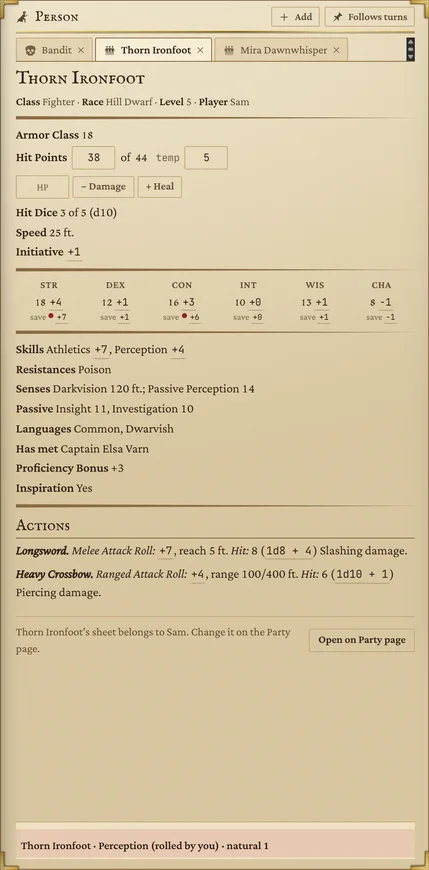
Their whole name, then Class, Race, Level and Player, and their sheet in the order a book's stat block reads: Armor Class, hit points, Hit Dice, Speed, Initiative, the six abilities with their saves (a dot marks a save they are proficient in), Skills, resistances, Senses and the passive scores, Languages, who from People they have met, Proficiency Bonus, Inspiration, Exhaustion when they have any, Spellcasting for a caster (spell save DC, spell attack, the slots left and the prepared spells), and their weapons as Actions.
Then their Gear: Worn, what is ticked Worn on the Party page (armor, a shield, a worn item; one that works only attuned says not attuned until it is), Weapons, every weapon they carry (their attacks are under Actions), and Carrying (n), everything else with how many and their coins, folded until you open it. Armor Class is the number their sheet works out, as the Party page shows it.
Their hit points can be changed here: type the number, or put an amount in the small box and press Damage or Heal; temporary hit points have their own box. It is written to their sheet, so the Initiative tracker, the Party page and their player's app show the same number. To change anything else, press Open on Party page: their sheet opens there at In play.
Someone from People
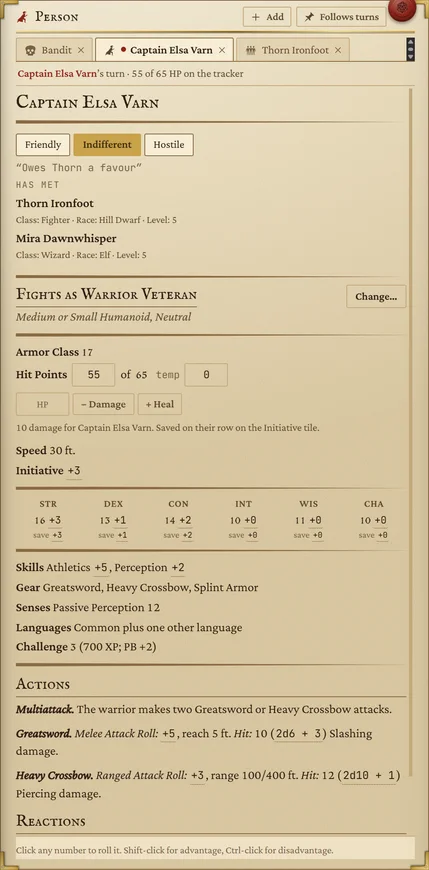
Their attitude (Friendly, Indifferent or Hostile: click another to change it), the last reason you gave, and the characters who have met them, the same ones the People page keeps. Under them, how they fight:
- Someone with no stat block yet has Give them one from the Bestiary…: find a creature and pick it, and its block is theirs, headed Fights as and the creature's name. Change… picks another or takes it off.
- Someone whose Notion row has its own stat block shows that.
Above them, what you need at the table, from their People card: the whole summary line (race, sex, role, faction), the short answers written down (status, assignment and the like), how they sound, what they want and your notes, and their secret, folded. Empty fields stay off the tile. Open in People, top right, opens their whole card. Click a field to change it, as on the card: a Notion person's change is written to Notion, and never over a change made there meanwhile.
A non-combat NPC has no stat block, only Non-combat NPC and Give them a stat block…. A combat NPC whose Notion row has its own numbers shows them, each modifier a roll.
The rest (attitude, Has met, the block they fight as) is kept in WyrmWright, and players never see it.
Rolling from it
Click any underlined number to roll it: an ability check or save, a skill, initiative, hit points, an attack's to-hit or its damage. Shift-click rolls with advantage, Ctrl-click with disadvantage. The latest roll shows at the foot of the tile, naming who rolled. A roll from a character's sheet says rolled by you, so it is never taken for their player's.
- An attack is aimed at the tracker's target. Advantage and disadvantage from both sides' conditions, and the attacker's exhaustion, are counted for you, a character's from their sheet as for a creature; Shift or Ctrl still picks outright.
- When the acting creature attacks a party member, that player's app is told whether it hit or missed.
- Damage can go straight into the fight, applied on the tracker.
Following the turn, or staying put
The tile follows the turn: whoever starts their turn on the tracker opens here, whether a creature, a party character or someone from People who joined the fight. When the turn passes to a name typed into the fight, the tile stays where it is and says so.
While someone is acting, their hit points here are their row's on the tracker, and changing them changes the row. A creature that isn't in the fight shows the book's hit points.
The button at the top reads Follows turns while it follows. Press it and it reads Stays here: the tile keeps the tab you're looking at, whatever the tracker does. Press it again to follow turns once more.
The party meets Captain Elsa Varn at the docks. On her tab, press Give them one from the Bestiary…, find the Warrior Veteran and pick it. When things turn ugly, add her to the fight from the Initiative tracker's Add someone: she joins with the Warrior Veteran's armor class and hit points, and when her turn comes round her tab opens here, her hit points ready to change.