Sound
Your own sound effects on a Soundboard, a click each: on your speakers, or for the whole table at once. Music in Spotify or another app dips under them by itself, and a Discord bot of your own can carry the table's sounds into a voice channel.
- Tiles
- Soundboard, Now playing
- Settings
- Music & voice, with Volume (every campaign); Discord (each campaign)
The Soundboard tile
- Default size
- 4 × 4 (smallest 3 × 3)
- More than one
- Yes; each holds 12 pads
- Players can hear it
- Pads set to the table
Up to twelve pads, each one of your own sounds: thunder, a tavern, rain on a loop. Click a pad to play it and again to stop it; Stop all stops everything. The tile has one volume for all its pads, and each pad its own under it. Sounds keep playing while you're on another page. A second Soundboard tile holds twelve more.
Adding a pad
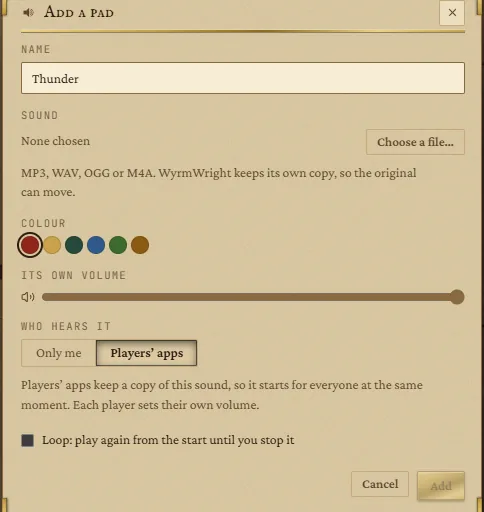
- Press Add your first sound (Add a sound once the tile has pads).
- Name it, then Choose a file…: an MP3, WAV, OGG or M4A. WyrmWright keeps its own copy, so the original can move.
- Pick a color and the pad's own volume, and tick Loop to play it again from the start until you stop it.
- Choose Who hears it, then press Add.
Each pad has a small button to change it; the dialog's Remove takes it off the tile. The pads' sounds go into campaign backups.
Who hears it
| Choice | Where it plays |
|---|---|
| Only me | Your speakers only, never the players' apps or screens. New pads start here. |
| Players' apps | Your speakers and every seated player's WyrmWright Player. Their apps keep a copy of the sound, so it starts for everyone at the same moment, and each player sets their own volume. |
| Discord | Your bot's Discord voice channel. Only with a bot set up for the campaign. |
| Both | The players' apps and the voice channel, starting together. Only with a bot set up. |
A table pad says under its name who hears it. Players' apps are offered only the sounds of saved table pads, never your Only me ones.
The Now playing tile
- Default size
- 4 × 4 (smallest 3 × 2)
- More than one
- No
- Players can hear it
- No
Whatever music app Windows shows in its own media panel (Spotify or any other): the track's picture and name, play, pause and skip, and a time bar. Beside them, the app's own volume and Discord's, from the Windows mixer, never your PC's main volume. Choose which app it follows from the tile, and whether the Discord slider and the time bar show. While a WyrmWright sound plays, the tile says the music has dipped.
Volume and speakers
The speaker button at the top of every page, and Settings › Music & voice › Volume: how loud each of WyrmWright's own sounds plays on this PC, and on which speakers. Other apps are left alone.
- Master turns every WyrmWright sound on this PC up or down at once, and mutes them all.
- Soundboard, Table music and Timer chimes each have their own level, mute and speakers. A row multiplies the tile's own volumes under it: a pad at 50% on a tile at 80% with Soundboard at 80% plays at 32%.
- Web tile: its level and mute; it plays on Windows' default speakers. A page's own player can set its volume back; muting always holds.
- What it plays, with a Discord bot set up: how loud everything the bot sends to the voice channel is. Master leaves it alone.
Each row plays on Master's speakers (Same as all) until you pick others for it; while any row plays somewhere else, Put every sound on… brings them all back. Speakers that are unplugged play on Master's until they are back. These change only what you hear: each player sets their own levels in their app.
Music dips under your sounds
In Settings › Music & voice: when a sound plays from WyrmWright, music apps dip, then come back when it ends. Only the apps are lowered, never your PC's main volume, so WyrmWright's own sounds stay loud.
- Which sounds: Soundboard pads, timer chimes, and sounds played for the table.
- Lower to 10%, 25% or 50% of the music's own level: music at 70% under a pad plays at about 18% at 25%.
- Fade: Quick, Smooth or Slow.
- Apps to lower: Spotify, other music apps on the Now playing tile, and Discord. Discord is off at first, because lowering it would also lower your players' voices.
- Play a test sound tries it.
When sounds overlap, the music stays down until the last one ends. If WyrmWright closes mid-dip, the music goes back up the next time it starts.
Discord
Settings › Discord is set for each campaign.
Posting to a channel
Paste a Discord channel's webhook link and press Send a test. Anyone with that link can post in the channel, so WyrmWright keeps it encrypted on this PC only; it's never put in backups or sent to players. Then choose what posts:
- Rolls players can see, from the players' apps, as they reach your dice log. Secret rolls are never posted.
- Session reminders: Session starts in …, when you press Post a reminder… on Tonight.
- Recap at Wrap up: ticked at first in the Wrap up dialog; you can untick it each time.
- Handout pictures: Never, Ask each time or Always. Only handouts sent to everyone; private handouts are never posted.
Your own Discord bot
Optional. A bot lets players roll with /roll in Discord, and plays your table pads in a voice channel. Set up my bot… walks you through four steps: make the bot on Discord's developer site, copy its token and paste it in, invite it to your server, and pick the server and voice channel it uses for this campaign. Make a new bot for WyrmWright rather than reusing one that runs elsewhere: two programs using one token both answer the same commands.
WyrmWright runs the bot while the app is open. The token is kept encrypted on this PC only; it's never put in backups, sent to players, or shown again. If the bot can't connect, its card says so and the rest of the app carries on.
Add a creaking-door sound and a storm loop to a Soundboard tile. When the party opens the crypt, click the door; while they explore, leave the storm looping quietly. Music playing on your PC dips while a sound plays.