Homebrew
Your campaign's own skills, conditions and spells, made and changed in one place, and used everywhere the book's are: on character sheets, in the Initiative tracker, and in your players' Player app. Your own items are here too, and creatures you make live in the Bestiary.
- Where
- Homebrew, under Reference on the rail
- Belongs to
- This campaign only
- Players see it
- Yes, on their own cards
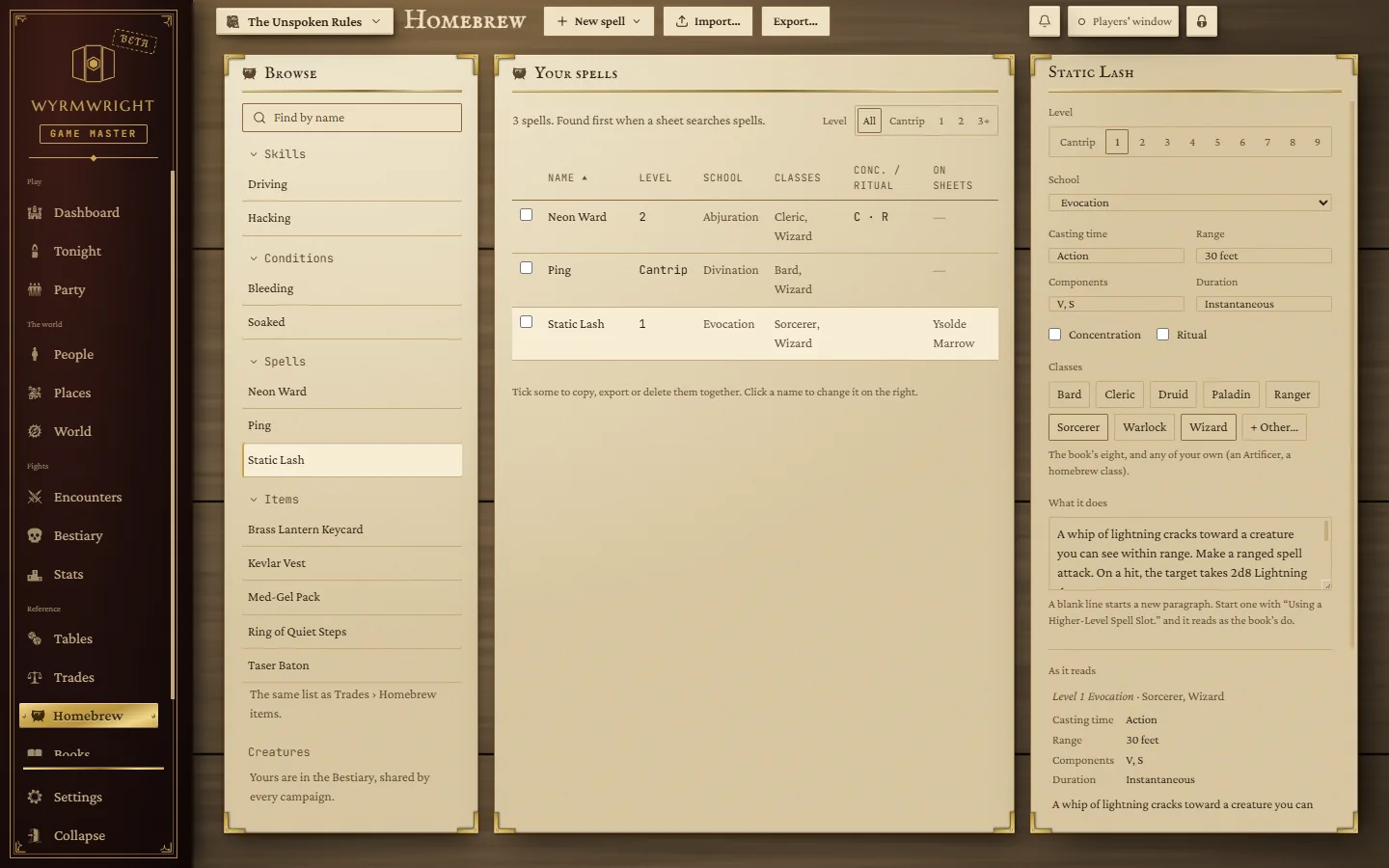
The page has three cards, as Trades does: Browse on the left, a table of the kind you picked in the middle, and the thing itself on the right. New skill, New condition, New spell or New item at the top of the page makes one of whichever kind you're looking at. Find by name in Browse searches all of them.
The table
- Click a column's heading to sort by it; click it again to turn the order round. Items can be narrowed to Weapons, Armor, Magic or For sale, and spells by level.
- Click a name to open it on the right.
- Tick some and a bar appears under the table: Add to a trade… (items), Copy, Export… and Delete… work on all of them at once.
New, Import and Export
- New item and New spell open a menu: Blank, Start from a book item (or spell; the SRD for this campaign's edition, copied into a new one of yours), A copy of the one open now, Import from a spreadsheet… and Get a blank template.
- Import… brings items, spells, skills or conditions in from a .csv file or cells pasted from a spreadsheet. See Importing homebrew.
- Export… saves every one of the kind you're looking at as a .csv, in the columns an import reads.
Skills
- Give it a name and pick the ability it uses. Proficiency and expertise add to it the same way they do for the book's eighteen.
- What it covers is shown on hover on a character's sheet, in Ask for a roll…, and on the player's card.
- Your skills sit under the eighteen on every character's sheet in this campaign, and are in Ask for a roll… and Group roll. Set who is proficient on each sheet on the Party page; Characters with it lists them here.
Conditions
- What it does is shown in the Initiative tracker's condition picker, where your conditions have their own heading under the book's fifteen, and on a player's card while they have it.
- Nothing is rolled or worked out for you: the tracker marks it, and you apply it.
- In this fight lists who has it on right now.
Spells
- Set its level (cantrip to 9th), school, casting time, range, components and duration, tick Concentration or Ritual, and pick the classes that get it: the book's eight, or + Other… for one of your own (none picked means any class).
- Under its details it shows as it reads: the same card a player opens from their spell list.
- When you search spells on a character's sheet, yours come first.
Feats
- Give it a category (Origin, General, Fighting Style or Epic Boon), a prerequisite as the book writes one (the app shows it but doesn't check it), whether it's Repeatable, and what it does. Under its details it shows as it reads, as the book's feats do on the Rules page.
- It joins the book's feats on the Rules page. Tick Players can look it up and players see it on their Rules page and in their level-up: a General feat at Ability Score Improvement, a Fighting Style or Epic Boon feat at those steps.
- A name can't be one of the book's feats. The new-character steps don't offer your own feats yet.
Items
Your own things for sale, with a price or a rarity and a description of up to 2,000 characters; the first 400 show on hover in a shop and on the Price Board, and all of it where the item is opened. It is the same list as Homebrew items on the Trades page, so a change in either place is a change in both. An item's Sold by chip opens that trade on the Trades page.
A weapon's Damage takes a number after the dice, such as 2d6-1: it goes on damage only, from −5 to +5, and to hit stays as it was. Something the app can't roll is refused with a line saying so.
A weapon's Mastery (2024 rules) is one of the book's eight, such as Sap or Vex. With one, a player can pick it at Weapon Mastery when they level up, if it is in their pack or you tick Players can look it up, and tick it Mastered on their Attacks card.
When it's used (a Potion or consumable, or Other): tick it to say what using the item does, as the book's thrown gear and grenades read: what it takes (Action, Bonus Action or Reaction), its range (Self, Touch, or Thrown with a distance), an area, a save (a DC, or blank for the book's 8 + Dex + proficiency), damage and whether a save halves it, and conditions with how long they last. A player's Use takes it from their pack and sends you the save; those who fail get an Apply line for the condition in Initiative's Waiting on you. With no save, as handcuffs, the condition simply lands: their target gets the Apply line. Untick Used up when it's used for something that lasts.
Shields give the book's +2 to AC unless you set their own AC bonus. Tick Can also attack with it for a shield bash: it goes on the Attacks card as a melee weapon, 1d4 bludgeoning unless you change it, with the properties you pick.
Ammunition is a kind of item of its own: a Magazine, Loose rounds or an Energy Cell. A magazine says what it's Refilled from (your loose rounds), and each lists what it Fits, the guns that picked it; loose rounds list the magazines they Refill. Click one to open it. In a player's pack each magazine or cell keeps its own count, so they see which are full, part-used or empty.
Guns (the 2024 GM's book, Firearms): tick Reload and pick its Ammo type. A Bullet gun either Takes a magazine or Holds its own rounds, like a revolver or shotgun. Then pick what it takes from your Ammunition items: Its magazine, Its rounds, or for an Energy Cell gun Its cell. Make one… makes the item already picked. Pick the same magazine on every pistol and it fits them all; the names are yours to choose. Set the rounds or shots and what a reload takes. A gun made before Ammunition items finds its ammo by name until you pick one: a magazine named for its caliber, such as Pistol Magazine, loose rounds starting with it, or any Energy Cell. Burst Fire spends 10 rounds for a DC 15 Dexterity save in a 10-foot cube. With Track ammo on, players swap, fill and reload from their Attacks card; recharging cells always comes to you to OK.
Damage reduction (a homebrew rule) is on armor, shields and worn items: an amount, then All damage or Chosen types. While a character wears it (and is attuned, if it needs that), the Initiative tracker takes that much off each hit before resistance, never below 0, and shows the sum, such as 8 slashing − 3 DR = 5. Two different items add up; two of the same item count once. Your own creatures can have it too, as a Damage Reduction line in the Bestiary (3, or 2 bludgeoning); players don't see a foe's.
Suggested
When an AI app suggests homebrew, or a change to one of yours, it waits in a Suggested group at the top of Browse. Click one to open it in the editor as a draft: nothing is saved until you press Add to Homebrew or Change it. One added from a suggestion has a small crystal ball by its name. See AI helper.
Players can look it up
At the top of a spell's or an item's editor, Players can look it up puts it on the Rules page in every player's app, marked (HB), without its price. It starts off: until you tick it, only you see it, and a player once it is on their sheet. The table's Players see column shows which are ticked. See Rules.
Deleting
Each one can be deleted from its card, and you are asked first. Deleting a skill takes it off every character's sheet in this campaign; deleting a condition takes it out of the tracker's picker; deleting a spell leaves its name on any sheet that has it, without its card.
Your setting has sailors, so you make a skill called Seamanship, pick Dex, and write Handling a boat, rigging and knots. On the Party page you make Tobin proficient. When the storm hits, Ask for a roll… on the Party page lists Seamanship with the rest, and Tobin's player rolls it in their app.