AI helper
Let an AI app on your PC, such as Claude Desktop, read the campaign you have open and help you prep: ask it what the party knows, who the players haven't met yet, or for a fight that suits them tonight. It can also suggest people, places, encounters, creatures, session plans and homebrew. These wait for you, and nothing is added until you press Add.
- Where
- Settings › AI helper
- Starts
- Off, until you turn it on
- Reads
- The open campaign, while WyrmWright is open
Turning it on
- In Settings › AI helper, turn on Let an AI app help you prep.
- Press Add to Claude Desktop. Claude Desktop opens and asks to install WyrmWright: press Install there. If Claude Desktop isn't on your PC, the card says so.
- Ask Claude something about your campaign. Under the button, the card shows when an AI app last asked something.
For another app (Claude Code, Cursor, VS Code or LM Studio), press Other AI apps…, pick it, copy the lines shown and paste them where it says, then restart that app. ChatGPT can't connect to apps on your PC yet.
What it can read
One switch for each kind of thing, the same for every campaign. Turn one off and your AI app is told it's off, and gets nothing from it.
- People, places, quests and the world: factions, who knows whom, rumors, routes, weather and shops.
- The party: characters, gear, spells and hit points. Never what a player sent only to you.
- Fights, encounters and the Party log: it can look at a fight that is running, but never change it.
- Your Notes and handouts: your Notes pages, roll tables and the words on handouts. Not pictures or maps.
- Bestiary, rules and your homebrew: creatures, spells, items and feats from the free rules (SRD), and anything you made. Never pages from your Books.
- Lines and veils, so it steers clear of them. Players' anonymous suggestions are never shared.
- Your notes about players: off at first, because these are about real people at your table.
While the screen lock is on, your AI app is only told that WyrmWright is locked.
Never shared
Whatever the switches say: whispers and passed notes, secret votes, players' private notes, your Books, maps and pictures, your license key, and your Discord, Notion and Spotify sign-ins. WyrmWright sends nothing anywhere itself; what your AI app reads goes to the AI company you use.
Suggestions
With Suggest new things for you to add on (it starts on), your AI app can suggest a person, a place, an encounter, a creature or a session plan. Each waits in the Suggestions tray down the right of the Tonight page. On any other page, a note in the corner says a new one has come, with Show me.
- Add makes it: a person in People, a place as a Notes page, an encounter in Encounters, a creature in the Bestiary, a plan as a prep page for its session in Notes.
- Edit first lets you change it before you add it.
- Not now takes it off the tray. Nothing is made.
- × folds the tray into a small tab in the corner until the next suggestion comes.
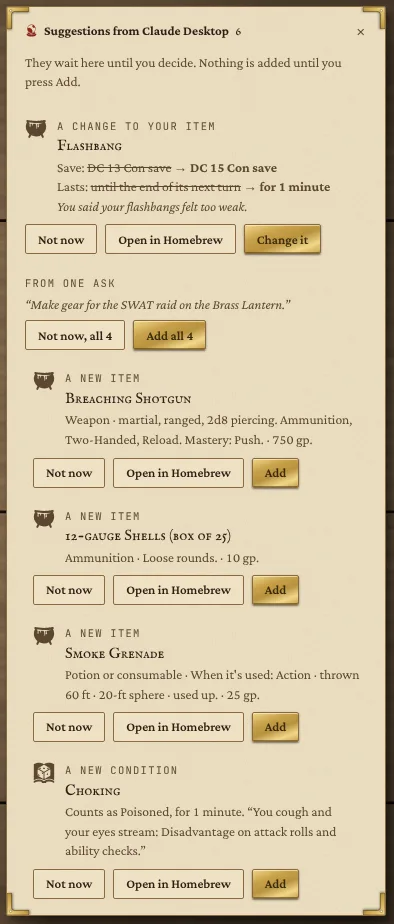
Homebrew suggestions
With Suggest homebrew, and changes to yours on (it starts on), your AI app can suggest new skills, conditions, spells, feats and items for Homebrew, or changes to ones you made. It can never delete anything.
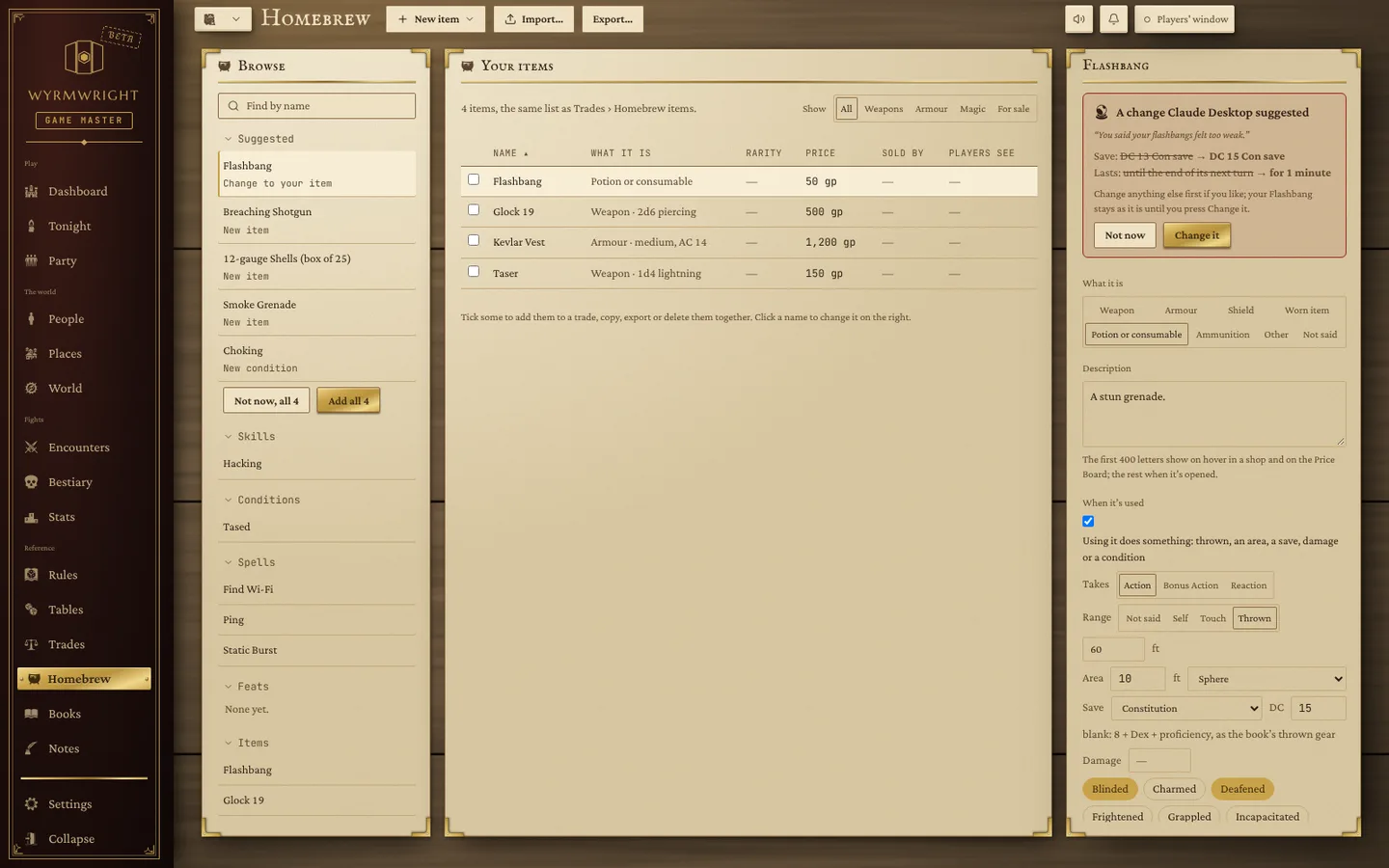
- They wait in the Suggestions tray and in a Suggested group at the top of Homebrew's Browse. It's one list, so acting in either place clears both.
- Each is checked by the same rules as the Homebrew editor. A name that is already one of the book's, or one of yours, is turned back, and your AI app is told to suggest a change instead.
- A change shows the parts it would change, the old value struck through. Your own stays as it is until you press Change it. If you edit it yourself in the meantime, Change it asks you to look again rather than lose your edit.
- Several suggested from one ask sit together under From one ask, with Add all and Not now, all.
- After Add, Add all or Change it, a note in the corner offers Undo. Undo takes it out again (and out of any trade you put it in since), or puts yours back as it was, and returns the suggestion to the tray.
Open in Homebrew
Open in Homebrew, or a click on it under Suggested, opens it in Homebrew's own editor as a draft. Change anything you like: nothing is saved until you press Add to Homebrew (or Change it). While it's a draft there is no Delete, and Players can look it up isn't shown.
After it's added
- It's yours, like anything you made. Added from Homebrew, it opens there.
- Players can look it up is always off when one arrives. Tick it yourself if players should find it on their Rules page.
- A small crystal ball by its name, in Browse and the table, marks one that came from a suggestion, and its editor says which app suggested it and when you added it. Players never see either.
Drafts in your Notes
Save drafts to your Notes starts off. Turn it on and your AI app can add a new Notes page with a draft, such as a recap or a session plan, tagged ai-draft. It never changes or deletes a page.
What it read
See what your AI read… lists everything an AI app asked for in this campaign, newest first, and the suggestions you added from it. It keeps 30 days and is never put in a backup or a copy you share. To stop an app reading, turn Let an AI app help you prep off.
Good to know
- Only the GM app has the AI helper. Players don't need anything, and see nothing of it.
- Claude Desktop can offer two ready-made asks: prepare the next session, and recap the last one.
- Your AI app reads only the campaign that's open, and its suggestions go into that campaign.