Chat
The table's chat on the board: what everyone at the table says, your word to all of them, and the lines you've pinned. It is the same chat as Chat… on the At the table card, so whichever you write in, the other shows it too.
- Default size
- 4 × 5 (smallest 3 × 4)
- More than one
- No, one chat per table
- Who reads it
- Everyone seated with the Player app
Reading it
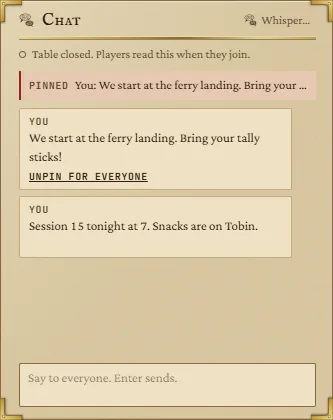
- The first line says whether your table is open and how many players are connected. While it is closed it says Table closed. Players read this when they join.
- Your pins sit above the chat. Past two lines they scroll in a strip of their own, so the chat keeps the tile.
- The chat runs oldest first and keeps itself scrolled to the newest line.
Saying something
- Type in the box at the foot and press Enter. Everyone at the table sees it.
- You can write before the table opens. Players read it when they join, so a word before the game works.
- Hover a message (or tab to it) for Pin for everyone, which pins it at the top of every player's chat. The same button unpins it.
Whispers
Whisper… in the tile's title bar writes to one player, several, or everyone, privately. With one player picked, your whispers with them show above the box. Whispers never show in the Chat tile: the tile is for what the whole table reads. You can also whisper from a seat's menu on the At the table card (right-click the seat, or press its ⋯).
As an NPC, in a language
Above the box, As lets you speak as someone from People, or type a name, and In picks a language other than Common. Whispers have the same two, and a handout has Written in. Players see the NPC's name and the language. A player whose character doesn't know the language sees the words jumbled. Under the message, Let read has a button for each of those players (and Everyone) that lets them read it, and a second click takes it back.
After the session
When the table opens again after six hours or more of quiet, last session's chat goes into everyone's Handouts as a letter, Table chat with its date, and its pins come off. Anything written since the gap stays, so your word before the game is still there. Opening the table again the same evening (after a restart or a campaign switch) moves nothing.
An hour before the game, type We start at the ferry landing. Bring your tally sticks! and press Enter, then pin it. When Maera joins she sees it pinned at the top of her chat, while last week's chat waits for her in Handouts.
See also The players' window and Tonight.