Guides / Widgets · World
Clocks
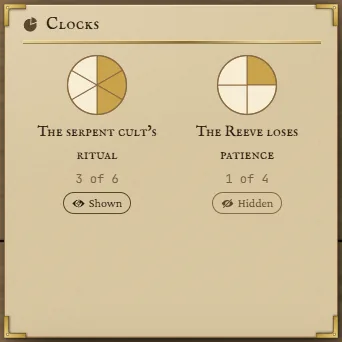
Your progress clocks on the board: a ritual nearing completion, a flood rising, a rival's plan coming together. Click a slice to fill it, and decide which clocks the players get to watch.
- Default size
- 4 × 4 (smallest 2 × 3)
- More than one
- No; it shows every clock
- Players can see it
- The clocks you mark Shown
Using it
- Click a slice to fill the clock up to that slice. Click the last filled slice to empty it again.
- The eye button switches a clock between Shown and Hidden.
- With no clocks yet, the tile offers Make one on the World page.
Making, renaming, deadlines and notes are on the World page's Clocks tab; the tile and the tab show the same clocks, and a change in one shows in the other.
What the players see
A shown clock appears on the players' window and on the players' own screens in WyrmWright Player, with its name and slices. Your note and the deadline stay with you.
Example
On the World page's Clocks tab, make a six-slice clock called The flood rises and mark it Shown. Each time the party wastes an hour, click its next slice on the Clocks tile, and the players watch it fill on the TV and in their app.