Initiative
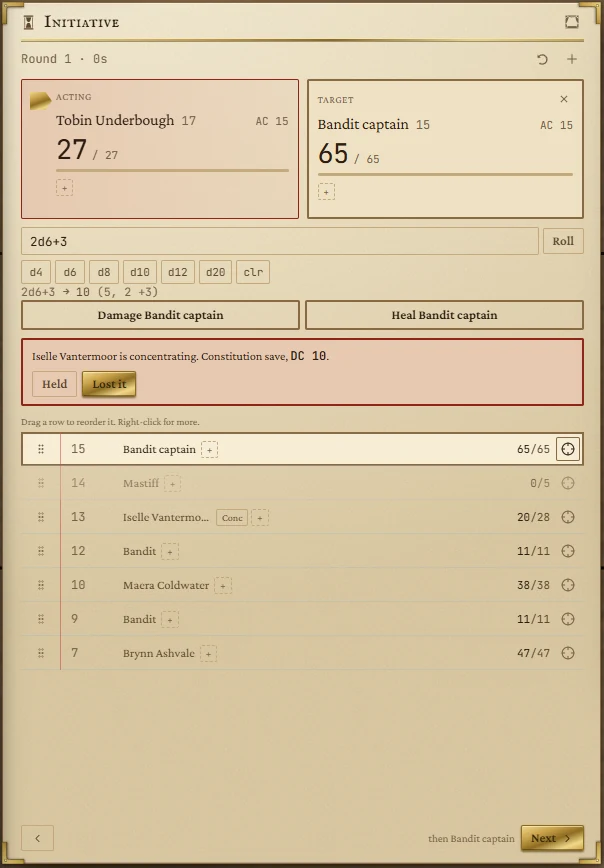
Turn order, hit points, conditions and death saves for one fight. Whoever is acting sits on the left, whoever they are aiming at on the right, and damage, healing and the 5e rules for dropping to zero are handled for you.
- Default size
- 6 × 8 (smallest 5 × 6)
- More than one
- No, one fight at a time
- Players can see it
- Yes, without the numbers
Getting everyone in
- Your characters: press Into Initiative on the Party page. Each rolls d20 plus their initiative bonus and comes in with their armour class and hit points.
- Anyone else: press + in the tracker's header (or Add someone when it's empty). Type a name, initiative, hit points and armour class, choose Against or Party, and press Add. The form stays open for the next one; press Done when you're finished. Blank boxes mean initiative 0, AC 10 and 1 hit point.
- Dragged in: drag a name from the Name Generator, an NPC from an NPCs tile, or a person from the People page (Into a fight). An NPC brings its AC and hit points; a bare name arrives with AC 10 and 1 hit point for you to fill in. Dragged-in creatures always join as foes.
Everyone is kept in initiative order, highest first.
Running turns
- Next passes the turn; the footer names who comes after. Passing the last creature starts the next round. The arrow on the left goes back a turn.
- The header counts rounds and the time they represent (six seconds a round).
- Creatures who are dead or stable are skipped; dying creatures still get their turn, for their death save.
Rearranging
- Drag a row by its grip between other rows to move it. It takes that seat's initiative number, so the numbers always match the order.
- Drop a row on the Acting panel to make it their turn now, without changing the round.
- Drop a row on the Target panel, or press the crosshair at the end of its row, to target them.
- Click a row's initiative number to type a new one (Enter keeps it, Esc cancels), or use the small arrows to swap places with a neighbour.
Hover a row for a moment to see a card with its AC, initiative, hit points, side, state and conditions.
Damage and healing
- Type an amount in the box: a number, or a roll such as
2d6+3. The die buttons build the roll for you: d6, d6 makes2d6; clr empties the box. - For a roll, press Roll or Enter. The result and its dice appear under the box.
- Press Damage or Heal. It applies to the target, or to whoever is acting if nobody is targeted.
The undo arrow in the header takes back the last damage, healing, death save or revival (the last 20 of them).
A healing potion dragged from Party Packs onto someone in the fight is drunk: they heal by the potion's dice and one comes out of the pack.
Concentration
When a creature marked Concentrating takes damage, the tracker asks for a Constitution save at the right DC (10, or half the damage if that is higher). Press Held or Lost it; losing it removes the marker.
Dropping to zero
The tracker follows the 5e rules:
- Temporary hit points are used up first.
- Damage that leaves a creature at 0 with as much again left over as its hit point maximum kills it outright.
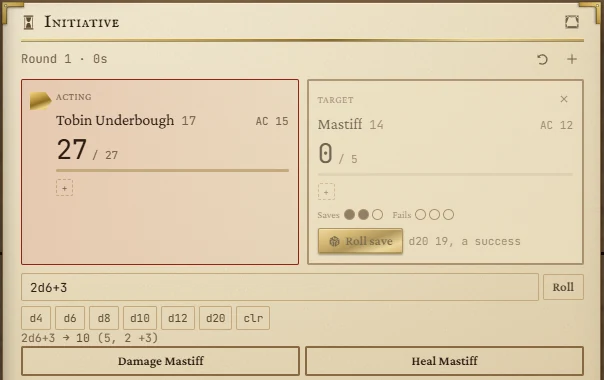
- A creature at 0 is dying: it makes death saves on its turn. Ten or higher is a success; a natural 20 brings it back with 1 hit point; a natural 1 counts as two failures. Three successes and it is stable, three failures and it is dead. Taking damage while dying is a failure.
- Foes have a Roll save button that rolls for them. For your players' characters there are boxes only: they roll, you tick. You can tick or untick any box to correct a mistake.
- Any healing brings a dying creature back and clears its saves. Healing doesn't raise the dead: right-click and choose Bring back at 1 HP or Restore to full.
Conditions
Click the + chip on a row (or the panel) to open the conditions for that creature. Toggle any of the fifteen conditions from the book; Concentrating sits underneath as a marker. Type one of your own in Add one of your own and it joins the list for everyone.
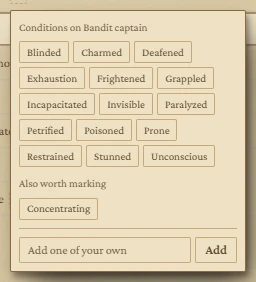
Conditions are labels: they remind you, but don't change any numbers. Exhaustion is a single chip in this version, without levels.
The right-click menu
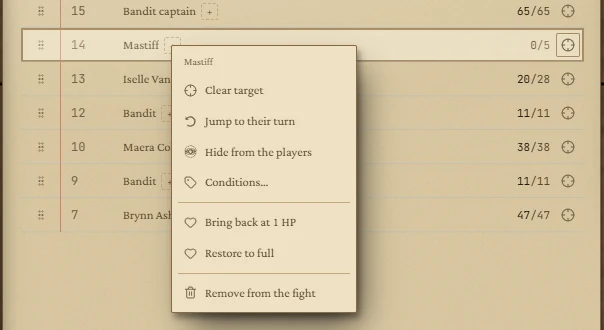
| Item | What it does |
|---|---|
| Target / Clear target | Aims damage and healing at them. |
| Jump to their turn | Makes it their turn now. |
| Hide from the players | Keeps them off the players' window, for a creature the party hasn't seen yet. An eye marks them. |
| Conditions… | Opens the conditions picker. |
| Bring back at 1 HP / Restore to full | Only for someone at 0 or dead. |
| Remove from the fight | Takes them out of the tracker. |
There's no single "end fight" button: remove combatants one by one when the fight is over.
Showing the fight to the players
The curtain button in the title bar sends the fight to the players' window, On the stage or Beside the stage. The players see turn order and who is acting, but never initiative numbers. Their own characters show hit points; foes show only a word: Unhurt, Hurt, Bloodied or Down. Hidden creatures don't appear at all. While a fight is running, a turn-order strip can also run along the bottom of their screen. See The board.
What is kept
The whole fight survives closing the app: the round, who is acting and targeted, everyone's numbers, conditions and death saves. The undo history, the amount in the damage box and the concentration prompt do not.